API keys and tokens
Your account API key authorizes every call to Tangle Sandbox. This page covers creating and limiting keys, how the CLI finds its credential, and how to give a browser a short-lived token so the key never leaves your server.
Account API keys
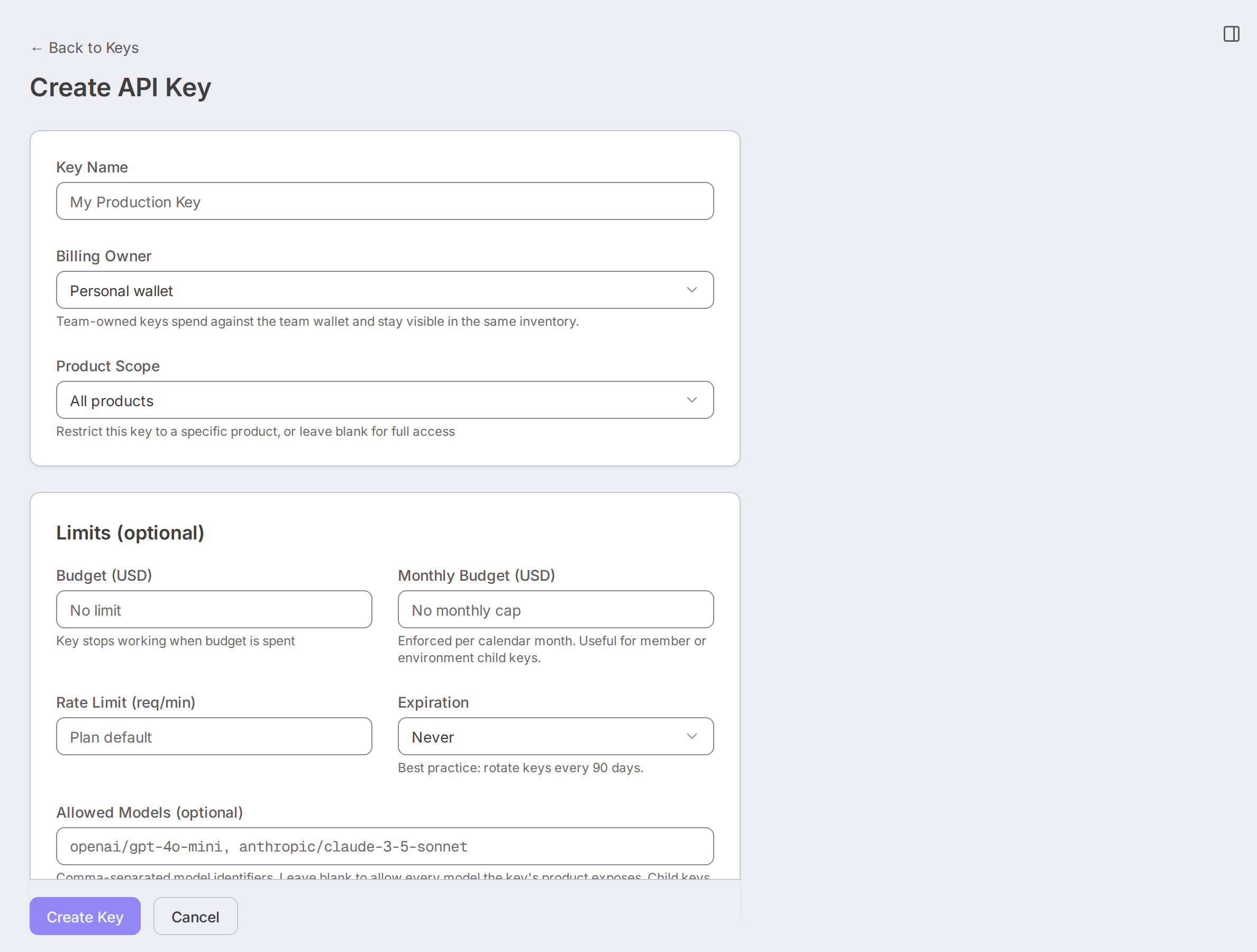
Create a key at id.tangle.tools/app/keys. Keys start with sk-tan- and are shown once.
Send the key as a bearer token:
curl -s https://sandbox.tangle.tools/v1/sandboxes \
-H "Authorization: Bearer $TANGLE_API_KEY"import assert from "node:assert/strict";
import { Sandbox } from "@tangle-network/sandbox";
const client = new Sandbox({
apiKey: process.env.TANGLE_API_KEY!,
baseUrl: "https://sandbox.tangle.tools",
});
const identity = await client.getIdentity();
assert(identity.customerId.length > 0);
assert(identity.billingOwnerId.length > 0);
assert(identity.apiKeyId === null || typeof identity.apiKeyId === "string");
assert.equal(typeof identity.billingDelegationAuthorized, "boolean");
console.log("The API accepted this key and identified its billing owner");The SDK reads no environment variables. TANGLE_API_KEY in these docs is a convention; pass the key however your app stores secrets.
client.withApiKey(otherKey) returns a second client with the same settings and a different key.
The key can create, run and delete every sandbox on your account. Keep it on a server, in a CI secret or in the CLI’s keychain. Never put it in browser JavaScript, local storage, a URL or an error message. Browsers get a scoped token.
Limit what a key can do
tangle keys create creates a key with limits and prints it once:
tangle keys create ci-agents --product sandbox --budget-usd 25 --rpm-limit 120 --expires-in-days 30| Flag | Effect |
|---|---|
--product <product> | The key works only for one product: sandbox, router, blueprint-agent, evals or agent-builder. Omit it for all products. |
--budget-usd <amount> | A hard spending cap in USD for this key. |
--rpm-limit <limit> | A requests-per-minute cap for this key. |
--expires-in-days <days> | The key stops working after this many days. |
tangle keys list shows each key’s id, prefix, product, last use and expiry. tangle keys revoke <keyId> revokes a key after a confirmation; pass --yes to skip it.
tangle keys create and tangle keys revoke refuse a browser-login session. Sign in with an API key first (tangle auth login --api-key) or set TANGLE_API_KEY.
Rotate a key
- Create the new key.
- Deploy it to every service and CI secret that uses the old one.
- Revoke the old key with
tangle keys revoke <keyId>or at id.tangle.tools/app/keys.
Sign in the CLI
| Command | What happens |
|---|---|
tangle auth login | Opens your browser and waits up to 2 minutes for you to sign in. |
tangle auth login --no-browser | Prints a device code to enter in any browser. The CLI waits up to 15 minutes. |
tangle auth login --api-key sk-tan-... | Checks the key against the API and stores it. |
tangle auth status | Checks the stored credential against the API. |
tangle auth logout | Removes the stored credential. |
The CLI stores its credential in the operating system keychain: the macOS keychain, or the Secret Service on Linux.
A Linux server or container without a keychain stores it in ~/.tangle/credentials.json (mode 0600) instead.
To skip the login, set TANGLE_API_KEY, or TANGLE_API_KEY_FILE with the path of a file that holds the key.
How the CLI finds a credential
Each command takes the first credential it finds, in this order:
--api-keyTANGLE_API_KEY_FILE, read on every useTANGLE_API_KEY- The keychain entry for the active profile
~/.tangle/credentials.json
The CLI loads a .env file from the current directory before it reads the environment, so a TANGLE_API_KEY there applies.
Profiles keep several accounts on one machine. tangle auth login --profile work signs a profile in, tangle auth profiles use work makes it active, and TANGLE_PROFILE=work selects it for one command.
There is no global --profile flag.
Give a browser a scoped token
A browser never receives your account key. Your server checks that the user owns the sandbox and session, mints a short-lived token for exactly that access, and returns only the token.
const box = await client.get(ownedSandboxId);
if (!box) throw new Error("Sandbox not found");

const scoped = await box.mintScopedToken({
  scope: "session-runtime",
  sessionId: ownedRuntimeSessionId,
  ttlMinutes: 5,
});

return {
  token: scoped.token,
  expiresAt: scoped.expiresAt.toISOString(),
  baseUrl: scoped.sidecarProxyUrl,
};
Your server chooses ownedRuntimeSessionId from its own records. Never mint a token for a session id the browser sends without checking that the user owns it.
scope | Gives the browser | Use with |
|---|---|---|
session-runtime | Reads, workspace changes and terminals for one session | createSandboxRuntimeClient with scoped.sidecarProxyUrl |
session-runtime with access: "read-only" | Read access to one session, including its event stream | SessionGatewayClient with scoped.sidecarProxyUrl |
read-only | Read access to the sandbox, no workspace or terminal changes | createSandboxRuntimeClient with scoped.sidecarProxyUrl |
session | Event reads for one browser session mapped to one runtime session | The Sandbox API’s /session WebSocket |
project | Event reads for the whole sandbox | The Sandbox API’s /session WebSocket |
ttlMinutes defaults to 5 and is clamped between 1 and 15. expiresAt is a Date; convert it before you send it as JSON.
In the browser, build the runtime client from those fields:
import { createSandboxRuntimeClient } from "@tangle-network/sandbox/runtime";

const delegated = await fetch("/api/sandbox/runtime-token", {
  method: "POST",
  credentials: "include",
}).then((response) => response.json());

const runtime = createSandboxRuntimeClient({
  baseUrl: delegated.baseUrl,
  token: delegated.token,
});

await runtime.health();
Before the token expires, fetch a new one from your server and call runtime.updateToken(nextToken). Existing code that holds runtime keeps working.
Scoped tokens are a TypeScript SDK feature. From Python or another language, call POST /v1/sandboxes/{id}/scoped-token with the same body; Python’s client.fetch("POST", path, json=...) sends it with your key.
Stream a session to a browser and resume after a drop
For a chat view that survives reloads and network changes, mint a read-only session-runtime token and pass sidecarProxyUrl to SessionGatewayClient.
It replays the running turn after a reconnect and asks your server for a fresh token when the old one expires.
const scoped = await box.mintScopedToken({
  scope: "session-runtime",
  sessionId: runtimeSessionId,
  access: "read-only",
});
return {
  token: scoped.token,
  expiresAt: scoped.expiresAt.getTime() / 1000,
  url: scoped.sidecarProxyUrl,
};import { SessionGatewayClient } from "@tangle-network/sandbox/session-gateway";
const client = new SessionGatewayClient({
url: initial.url,
token: initial.token,
sessionId,
runtimeSessionId,
onTokenRefresh: () => fetchScopedToken(sessionId),
handlers: {
onAgentEvent: (channel, data, seq) => render({ channel, data, seq }),
onStreamGap: () => void client.replay(),
onError: (message, code) => console.error(code, message),
},
});
client.connect();sessionId is your browser’s own stable id, kept across reloads; runtimeSessionId is the coding-agent session your server authorized for it.
Stream output covers the event types and what to do with each.
Agents that share a sandbox
box.agents.start(), stop() and the sandbox lifecycle calls need the account key. Keep them on your server.
A scoped token reaches only the session its scope names. Several agents in one sandbox explains what agents in one sandbox can see of each other.
Next steps
- How sandboxes work: states, lifetimes and the security boundary.
- Teams: share sandboxes, secrets and templates with your team.
- Pricing and spend: key budgets and other spend limits.